Securing Self-Hosted Applications with Zero Trust Network Access (ZTNA)
Disclaimer: This post is not sponsored. All opinions are my own.
In this post, I will walk through how non-enterprise users can secure self-hosted applications with Zero Trust Network Access (ZTNA) using Tailscale—an identity-based connectivity platform with a generous free tier.
Self-hosting spans a wide range of applications, but this guide focuses on a practical example: integrating Tailscale with a Django web application deployed on Fly.io. While the specifics center on this setup, the steps can be adapted to other tech stacks and deployment environments.
If you are interested in other use cases, Tailscale's documentation includes a variety of setup guides, covering integrations such as Pi-hole with Tailscale, as well as deployment on container platforms like Docker and Kubernetes.
Project Repository
The GitHub repository for this reference implementation is available at https://github.com/voidst1/django-flyio-tailscale/
Rationale Behind the Choices
With the rise of “vibe coding,” personalised web applications are being built at an accelerating pace—often at the expense of security. ZTNA helps mitigate some of these risks by introducing a compensating security layer that enforces strict, policy-based access controls.
I chose Django for its mature, production-ready, batteries-included full-stack framework, and Fly.io for its cost-efficient, developer-friendly hosting platform. Fly Machines run on Firecracker microVMs—the same lightweight virtualisation technology used by AWS Lambda—providing fast startup times and strong isolation.
Zero Trust Network Access (ZTNA)
Let's begin with a definition from Zscaler:
Zero trust network access (ZTNA) is a set of technologies that enable secure remote access to internal applications. Trust is never granted implicitly, and access is granted on a need-to-know, least-privileged basis defined by granular policies. ZTNA gives users secure connectivity to private apps without placing them on the network or exposing apps to the internet.
In short, ZTNA reduces external attack surfaces by eliminating direct exposure of internal systems to the internet and blocking unauthorised access before a connection is ever established.
With ZTNA:
- Applications are not directly accessible from the public internet
- Users do not gain access to the underlying network
- Access is brokered through a ZTNA service only after authentication and authorisation
As a result, attackers cannot easily discover or scan internal applications, significantly reducing opportunities for reconnaissance, brute-force attempts, and targeted exploitation.
Tailscale
Tailscale is a zero-configuration, software-defined mesh VPN built on top of the open-source WireGuard protocol.
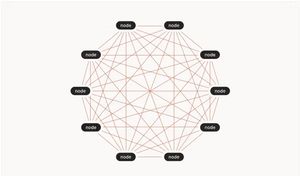
It securely connects your devices into a private network over the internet without requiring manual VPN setup, port forwarding, or complex networking configuration. Each device is authenticated through an identity provider and is granted only explicitly defined access, following a zero-trust model where no device is automatically trusted just because it’s on the network.
Once connected, devices communicate directly via encrypted peer-to-peer connections when possible, or through relays when necessary, while maintaining end-to-end encryption in all cases.
Django on Fly.io
Prerequisite
To deploy on Fly.io, you will need to create an account and install the Fly CLI tool (flyctl) on your system.
Reference Commit for Changes
You can refer to commit 04d4fd6 to review the changes required for this section, which will be explained step by step below.
Using uv instead of Poetry
Fly Buildpacks for Python applications (including Django) is designed around conventional packaging workflows, such as Poetry or a standard pip-based setup using a requirements.txt file.
This guide takes a different approach by using uv, a modern Rust-based Python package manager, which is significantly faster, but at the time of writing, not yet supported by Fly.io’s automated scaffolding.
When you run the Fly.io launch wizard, it generates two key files:
Dockerfile, which defines how the application is built and executed inside a containerfly.toml, which controls deployment settings such as app metadata, services, and runtime configuration.
Example Dockerfile
Here is a working Dockerfile for uv, along with its accompanying start.sh script.
FROM python:3.14-slim
ENV PYTHONDONTWRITEBYTECODE 1
ENV PYTHONUNBUFFERED 1
# Install uv
COPY /uv /uvx /bin/
WORKDIR /app
# Copy dependency files first (better caching)
COPY pyproject.toml uv.lock ./
# Install dependencies via uv
RUN uv sync --frozen --no-cache
# Copy project
COPY . .
# Expose port
EXPOSE 8000
# Start script
RUN chmod +x start.sh
CMD ["./start.sh"]#!/bin/bash
uv run python manage.py migrate --noinput
uv run python manage.py collectstatic --noinput
# Start your app (important: last process)
uv run gunicorn mysite.wsgi:application --bind 0.0.0.0:8000 &
# Keep container alive
waitExample fly.toml file
And here is the fly.toml file.
app = 'your-app-name'
primary_region = 'sin'

[http_service]
  internal_port = 8000
  force_https = true
  auto_stop_machines = 'stop'
  auto_start_machines = true
  min_machines_running = 0

[[vm]]
  memory = '1gb'
  cpus = 1

[[statics]]
  guest_path = '/app/staticfiles'
  url_prefix = '/static/'

[mounts]
  source = "data"
  destination = "/data"
Static files are served directly by the Fly Proxy, so no additional service is required.
The paths defined in the [[static]] section should match the corresponding configuration in settings.py.
# settings.py
STATIC_URL = "static/"
STATIC_ROOT = BASE_DIR / 'staticfiles'
Configure SQLite
I am using SQLite instead of a separate PostgreSQL database to minimise hosting costs. This approach is suitable for a simple single-machine setup that does not require horizontal scaling.
- Create a new fly volume for persistent storage
$ fly volumes create data --size 1 -a <app-name> -r <region-code>- Configure a persistent volume mount for data storage in
fly.toml
[mounts]
  source = "data"
destination = "/data"- Configure SQLite database path and optimisations in
settings.pyfor Fly.io
if os.getenv("FLY_APP_NAME"):
    DATABASE_PATH = "/data/db.sqlite3"
else:
    DATABASE_PATH = BASE_DIR / "db.sqlite3"

DATABASES = {
    "default": {
        "ENGINE": "django.db.backends.sqlite3",
        "NAME": DATABASE_PATH,
        "OPTIONS": {
            "init_command": (
                "PRAGMA journal_mode=WAL;"
                "PRAGMA synchronous=NORMAL;"
                "PRAGMA busy_timeout=5000;"
                "PRAGMA temp_store=MEMORY;"
            ),
        },
    }
}
Add Fly.io subdomain to ALLOWED_HOSTS
# settings.py
FLY_APP_NAME = os.getenv("FLY_APP_NAME")
ALLOWED_HOSTS = [
    f"{FLY_APP_NAME}.fly.dev",
]
Configure Production Secret Key
- Update
settings.pyto loadSECRET_KEYfrom environment variables
SECRET_KEY = os.environ.get("SECRET_KEY", "django-insecure-xxxxxxxxxx")- Generate a new secret key for production use
$ uv run python -c 'from django.core.management.utils import get_random_secret_key; print(get_random_secret_key())'- Store the secret key as
SECRET_KEYin Fly.io as a production secret
$ fly secrets set SECRET_KEY=new-secret-keyDisable Debug Mode in Production
Simple check for production and disabling debug mode
# settings.py
DEBUG = os.getenv("FLY_APP_NAME") is None
Tailscale on Fly.io
With the Django application successfully deployed on Fly.io, the next step is to integrate Tailscale into the project.
Prerequisite
If you don’t already have Tailscale set up, follow the quickstart guide to get it up and running.
Reference Commit for Changes
You can refer to commit b9766d1 to review the changes required for this section, which will be explained step by step below.
Update the Dockerfile
Copy Tailscale binaries and prepare runtime directories in the Dockerfile.
# Copy Tailscale binaries from the tailscale image on Docker Hub
COPY /usr/local/bin/tailscaled /app/tailscaled
COPY /usr/local/bin/tailscale /app/tailscale
RUN mkdir -p /var/run/tailscale /var/cache/tailscale /var/lib/tailscaleUpdate the start.sh Script
Here’s the updated start.sh file, which starts Tailscale and serves the application on the tailnet (Tailscale network).
#!/bin/bash

set -euo pipefail

: "${TAILSCALE_AUTHKEY:?TAILSCALE_AUTHKEY must be set}"

TAILSCALE_SOCKET="/var/run/tailscale/tailscaled.sock"
TAILSCALE_STATE="/var/lib/tailscale/tailscaled.state"

# Start tailscaled
./tailscaled \
  --state=${TAILSCALE_STATE} \
  --socket=${TAILSCALE_SOCKET} &

# Wait for socket to exist (daemon ready)
until [ -S "$TAILSCALE_SOCKET" ]; do
  sleep 0.2
done

# Bring up Tailscale
./tailscale \
  --socket=${TAILSCALE_SOCKET} \
  up \
  --authkey=${TAILSCALE_AUTHKEY} \
  --hostname=${FLY_APP_NAME} \
  --accept-routes

# Wait until it's ready instead of blind sleep
until ./tailscale --socket=${TAILSCALE_SOCKET} status >/dev/null 2>&1; do
  sleep 0.5
done

uv run python manage.py migrate --noinput
uv run python manage.py collectstatic --noinput

# Start your app (important: last process)
uv run gunicorn mysite.wsgi:application --bind 0.0.0.0:8000 &

# Expose app via Tailscale
./tailscale serve --bg http://127.0.0.1:8000

# Keep container alive
wait -n
Note that serve is not enabled by default on tailnet, and you might see the following warning in the logs,
Serve is not enabled on your tailnet.
To enable, visit:
         https://login.tailscale.com/f/serve?node=XXXXXXXXXX
wait -ncauses the script to exit when either process terminates, improving reliability. Without it, if Gunicorn crashes, the container may continue running and appear healthy even though the application is no longer serving requests.
Create Tailscale Auth Key
An auth key is required for the app to connect to Tailscale. It can be created in the Tailscale admin dashboard under Settings → Personal Settings → Keys → Auth keys.
Tip: When troubleshooting, it can be helpful to use more permissive settings—enable Reusable to avoid having to generate and configure a new key for each deployment, since each update spins up a new container.
Also enable Ephemeral to ensure inactive nodes are automatically removed.
Store the auth key as TAILSCALE_AUTHKEY in Fly.io as a production secret, matching the environment variable used in start.sh.
$ fly secrets set TAILSCALE_AUTHKEY=secret-authkeyInstall and configure WhiteNoise
WhiteNoise enables Django web applications to serve their own static files, providing a simple, production-ready solution.
This is necessary because Fly Proxy is not available within the tailnet, so an alternative mechanism is needed to serve static files.
1. Install WhiteNoise with uv
$ uv add whitenoise2. Add to MIDDLEWARE
Add it to the MIDDLEWARE configuration in settings.py right after SecurityMiddleware.
MIDDLEWARE = [
    "django.middleware.security.SecurityMiddleware",
    "whitenoise.middleware.WhiteNoiseMiddleware",
    ...
]
3. (Optional) Enable compression and caching support
Add the following to settings.py
STATICFILES_STORAGE = 'whitenoise.storage.CompressedManifestStaticFilesStorage'Update ALLOWED_HOSTS
Add your tailnet DNS name to the ALLOWED_HOSTS configuration in settings.py
Remove the Fly.io subdomain to disable public access, or defer removal if preferred.
ALLOWED_HOSTS = [
    # f"{FLY_APP_NAME}.fly.dev",
    ".tail<ID>.ts.net",
]
Note the
.prefix in the tailnet DNS name. This functions as a wildcard match.This is important when using a reusable key because deployments are rolling. When the base name is already in use, numeric suffixes may be added, e.g.
fly-app-1,fly-app-2, etc, to avoid naming conflicts. As a result, Tailscale machine hostnames are not guaranteed to remain fixed.
Disabling public access
Once the app is working over the tailnet, you can remove public access by removing the http_service and statics sections from fly.toml.
You’re all set—your app is now running privately on your own tailnet, accessible only to your trusted devices.
Ending Notes
What I have covered here is a simple single-machine setup on Fly.io. If you’re interested in exploring other configurations, Tailscale documentation includes additional use cases that may provide further ideas and inspiration.
One tradeoff to keep in mind when using Tailscale is that it is not compatible with Fly.io’s wake-on-request feature. That functionality is tightly integrated with Fly Proxy and can significantly reduce costs for smaller applications with sporadic traffic by automatically suspending idle machines and starting them only when incoming requests arrive.